LiveTranscribe Operator
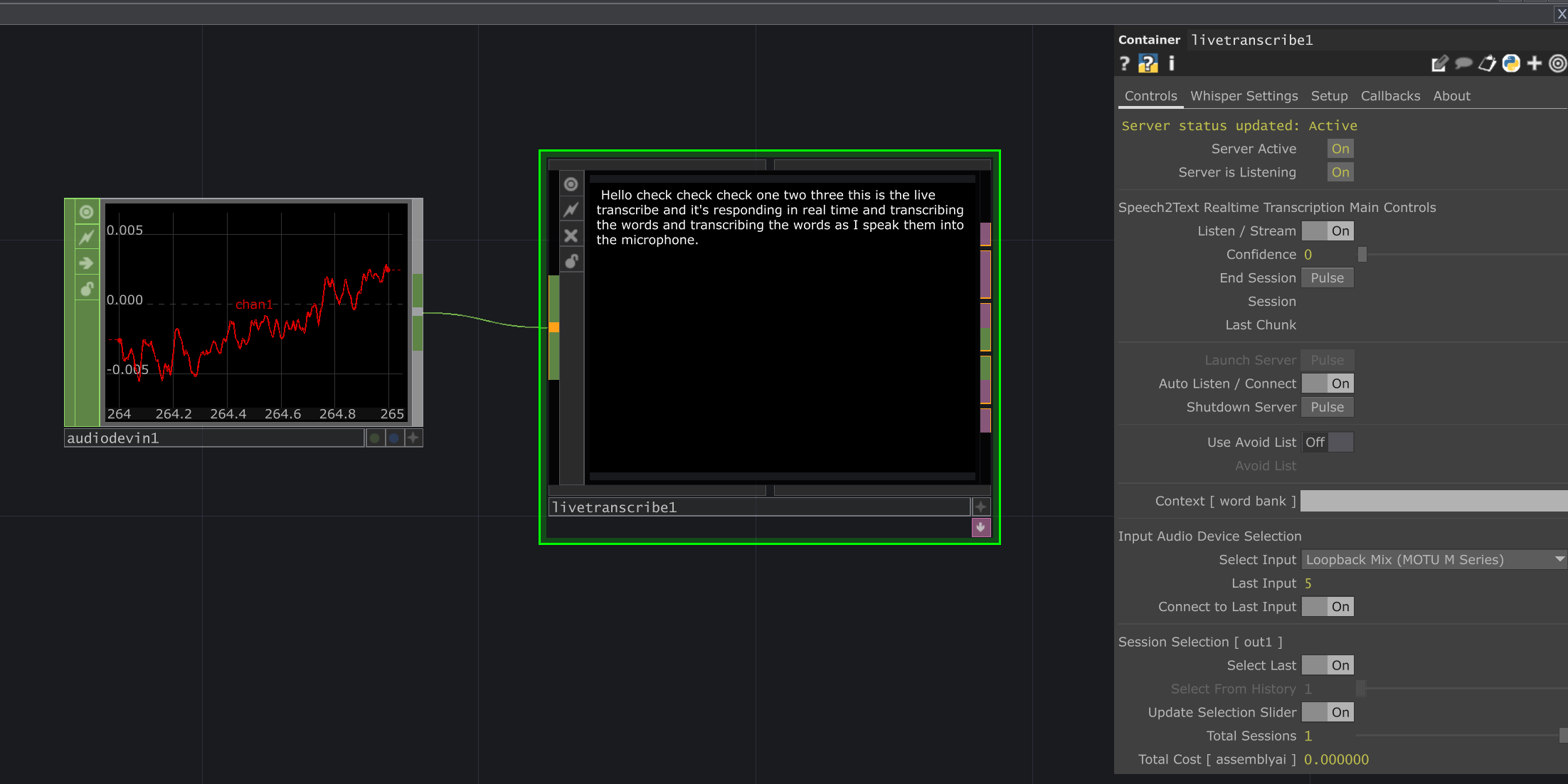
The LiveTranscribe operator provides real-time speech-to-text capabilities within TouchDesigner. It processes audio input and converts spoken words into text, which can be used for various interactive applications, logging, or further processing.
It offers two primary modes of operation:
- Local Whisper: Utilizes OpenAI’s Whisper models running directly on your machine. This offers privacy and potentially lower latency but requires a capable local machine (especially GPU for larger models).
- AssemblyAI Cloud Service: Leverages AssemblyAI’s powerful transcription API. This requires an internet connection and an AssemblyAI API key (streaming service is paid), but offers high accuracy and potentially handles scaling better.
Installation
Section titled “Installation”Follow these steps to install the necessary dependencies for LiveTranscribe:
- Set Base Folder: Go to the
Setuptab and specify aBase Folder. This is where the Python virtual environment (venv) and required libraries will be installed. It’s recommended to create a dedicated folder (e.g.,D:/TD-Tools/LiveTranscribe-Install). - Install Service:
- For Local Whisper: Click the
Install Whisperbutton. - For AssemblyAI: Click the
Install AssemblyAIbutton.
- For Local Whisper: Click the
- Confirm Installation: A popup will confirm the libraries to be installed. Click the confirmation button (
Installor similar) to proceed. The operator will create the virtual environment and install packages. This might take some time. - (Windows CUDA Users): If using local Whisper with an NVIDIA GPU and you haven’t used CUDNN before, download the appropriate CUDNN version for your CUDA Toolkit (11.8 or 12.1) from the NVIDIA CUDNN Archive. Copy the contents (
bin,lib,includefolders) from the downloaded CUDNN archive into your CUDA Toolkit installation directory (e.g.,C:\Program Files\NVIDIA GPU Computing Toolkit\CUDA\v12.1\). - (macOS Users): The installer will attempt to install
PortAudiousing Homebrew if it’s not found.
Once installation is complete, the respective install button on the Setup page will become disabled.
Parameters
Section titled “Parameters”Controls Page
Section titled “Controls Page” Status (Status)
op('live_transcribe').par.Status Str - Default:
Server status updated: Active
Server Active (Active)
op('live_transcribe').par.Active Toggle - Default:
On
Server is Listening (Listening)
op('live_transcribe').par.Listening Toggle - Default:
On
Speech2Text Realtime Transcription Main Controls Header
Listen / Stream (Listen)
op('live_transcribe').par.Listen Toggle - Default:
On
Confidence (Confidence)
op('live_transcribe').par.Confidence Float - Default:
0
End Session (Endsession)
op('live_transcribe').par.Endsession Pulse - Default:
None
Session (Session)
op('live_transcribe').par.Session Str - Default:
None
Last Chunk (Chunk)
op('live_transcribe').par.Chunk Str - Default:
None
Launch Server (Launch)
op('live_transcribe').par.Launch Pulse - Default:
None
Auto Listen / Connect (Autolisten)
op('live_transcribe').par.Autolisten Toggle - Default:
On
Shutdown Server (Shutdown)
op('live_transcribe').par.Shutdown Pulse - Default:
None
Use Avoid List (Useavoidlist)
op('live_transcribe').par.Useavoidlist Toggle - Default:
Off
Avoid List (Avoidlist)
op('live_transcribe').par.Avoidlist Str - Default:
None
Context [ word bank ] (Initialprompt)
op('live_transcribe').par.Initialprompt Str - Default:
None
Input Audio Device Selection Header
Last Input (Lastinput)
op('live_transcribe').par.Lastinput Str - Default:
5
Connect to Last Input (Connecttolast)
op('live_transcribe').par.Connecttolast Toggle - Default:
On
Session Selection [ out1 ] Header
Select Last (Selectlast)
op('live_transcribe').par.Selectlast Toggle - Default:
On
Select From History (Selectresponse)
op('live_transcribe').par.Selectresponse Int - Default:
1
Update Selection Slider (Updateslider)
op('live_transcribe').par.Updateslider Toggle - Default:
On
Total Sessions (Totalsessions)
op('live_transcribe').par.Totalsessions Int - Default:
1
Total Cost [ assemblyai ] (Totalcost)
op('live_transcribe').par.Totalcost Str - Default:
0.000000
Whisper Settings Page
Section titled “Whisper Settings Page” Speech2Text Whisper Settings Header
Use Local (Uselocal)
op('live_transcribe').par.Uselocal Toggle - Default:
On
Finalize After (Finalizeafter)
op('live_transcribe').par.Finalizeafter Float - Default:
0.381
Translate (Translate)
op('live_transcribe').par.Translate Toggle - Default:
Off
Use VAD (Usevad)
op('live_transcribe').par.Usevad Toggle - Default:
On
VAD Threshold (Vadthreshold)
op('live_transcribe').par.Vadthreshold Float - Default:
0.5- Range:
- 0 to 1
Keep Server Alive (Keepserveralive)
op('live_transcribe').par.Keepserveralive Toggle - Default:
Off
Max Connection Seconds (Maxconnectiontime)
op('live_transcribe').par.Maxconnectiontime Int - Default:
7200
Local File Speech2Text Transcription Header
Transcribe File (Transcribefile)
op('live_transcribe').par.Transcribefile Pulse - Default:
None
File (File)
op('live_transcribe').par.File File - Default:
None
Setup Page
Section titled “Setup Page” LiveTranscribe Readme (Readme)
op('live_transcribe').par.Readme Pulse - Default:
None
I/O Settings Header
OSC Address (Oscip)
op('live_transcribe').par.Oscip Str - Default:
127.0.0.1
OSC In Port (Oscinport)
op('live_transcribe').par.Oscinport Int - Default:
9086
OSC Out Port (Oscoutport)
op('live_transcribe').par.Oscoutport Int - Default:
8986
Whisper Port [ local ] (Whisperport)
op('live_transcribe').par.Whisperport Int - Default:
9151
AssemblyAI Streaming API Header
AssemblyAI API key (Apikey)
op('live_transcribe').par.Apikey Str - Default:
stored in Basefolder/config.json
Get AssemblyAI API Key (Getapikey)
op('live_transcribe').par.Getapikey Pulse - Default:
None
Python Installation Header
Base Folder (Basefolder)
op('live_transcribe').par.Basefolder Folder - Default:
D:/TD-tox/LiveTranscribe
Install AssemblyAI (Installassembly)
op('live_transcribe').par.Installassembly Pulse - Default:
None
Install Whisper (Installwhisper)
op('live_transcribe').par.Installwhisper Pulse - Default:
None
Current Transcript History [ realtime sessions + transcripts ] Header
Save Transcript File (Savetranscript)
op('live_transcribe').par.Savetranscript Pulse - Default:
None
Transcript File (Transcriptfile)
op('live_transcribe').par.Transcriptfile File - Default:
None
Load Transcript File (Loadtranscriptfile)
op('live_transcribe').par.Loadtranscriptfile Pulse - Default:
None
New Transcript File (Newtranscriptfile)
op('live_transcribe').par.Newtranscriptfile Pulse - Default:
None
Callbacks Page
Section titled “Callbacks Page” Callback DAT (Callbackdat)
op('live_transcribe').par.Callbackdat DAT - Default:
None
Edit Callbacks (Editcallbacksscript)
op('live_transcribe').par.Editcallbacksscript Pulse - Default:
None
Create Callbacks (Callbackcreatepulse)
op('live_transcribe').par.Callbackcreatepulse Pulse - Default:
None
onTranscriptPartial (Ontranscriptpartial)
op('live_transcribe').par.Ontranscriptpartial Toggle - Default:
On
onTranscriptFinal (Ontranscriptfinal)
op('live_transcribe').par.Ontranscriptfinal Toggle - Default:
On
onSessionStart (Onsessionstart)
op('live_transcribe').par.Onsessionstart Toggle - Default:
On
onSessionEnd (Onsessionend)
op('live_transcribe').par.Onsessionend Toggle - Default:
On
onServerReady (Onserverready)
op('live_transcribe').par.Onserverready Toggle - Default:
On
onFileTranscript (Onfiletranscript)
op('live_transcribe').par.Onfiletranscript Toggle - Default:
On
About Page
Section titled “About Page” Bypass (Bypass)
op('live_transcribe').par.Bypass Toggle - Default:
Off
Show Built-in Parameters (Showbuiltin)
op('live_transcribe').par.Showbuiltin Toggle - Default:
Off
Version (Version)
op('live_transcribe').par.Version Str - Default:
0.1.8
Last Updated (Lastupdated)
op('live_transcribe').par.Lastupdated Str - Default:
2025-05-03
Creator (Creator)
op('live_transcribe').par.Creator Str - Default:
dotsimulate
Website (Website)
op('live_transcribe').par.Website Str - Default:
https://dotsimulate.com
ChatTD Operator (Chattd)
op('live_transcribe').par.Chattd OP - Default:
/dot_lops/ChatTD
Callbacks
Section titled “Callbacks”LiveTranscribe provides callbacks to react to transcription events.
Available Callbacks:
onTranscriptPartialonTranscriptFinalonSessionStartonSessionEndonServerReadyonFileTranscript
The info dictionary passed to each callback contains relevant details. For example:
onTranscriptPartial/onTranscriptFinal:info['transcript'](full text),info['chunk'](latest segment),info['status'],info['session_id'],info['confidence'].onSessionStart/onSessionEnd:info['session_id'],info['status'].onServerReady:info['server_status'](boolean).onFileTranscript:info['transcript'],info['session_id'](filename),info['json_file'](path to detailed results).
Usage Examples
Section titled “Usage Examples”Basic Local Whisper Transcription
Section titled “Basic Local Whisper Transcription”- Complete the Installation steps for Whisper.
- Go to the
Whisper Settingspage. - Ensure
Use LocalisOn. - Select a
Whisper Model(e.g.,base.enormedium.enfor a balance of speed and accuracy). - Go to the
Controlspage. - Pulse
Launch Server. - Select your desired audio input device from the
Select Inputmenu. - Toggle
Listen / StreamOn. - Speak into your microphone. Transcriptions will appear in the
SessionandLast Chunkfields, and trigger callbacks if enabled. - Toggle
Listen / StreamOffto stop. - Pulse
Shutdown Serverwhen finished.
Basic AssemblyAI Transcription
Section titled “Basic AssemblyAI Transcription”- Complete the Installation steps for AssemblyAI.
- Go to the
Setuppage and enter yourAssemblyAI API key. - Go to the
Whisper Settingspage and ensureUse LocalisOff. - Go to the
Controlspage. - Pulse
Launch Server. - Select your desired audio input device from the
Select Inputmenu. - Toggle
Listen / StreamOn. - Speak into your microphone.
- Toggle
Listen / StreamOffto stop. - Pulse
Shutdown Serverwhen finished.
Technical Notes
Section titled “Technical Notes”- Resource Usage: Local Whisper models, especially larger ones, require significant CPU/GPU resources and VRAM. Monitor system performance.
- AssemblyAI Costs: The AssemblyAI streaming service is paid. Monitor your usage and costs on the AssemblyAI dashboard. The
Total Costparameter provides an estimate only. - Network Ports: Ensure the specified OSC and Whisper ports are not blocked by firewalls.
- Python Environment: All dependencies are installed within a dedicated virtual environment located in the
Base Folderto avoid conflicts.
Related Operators
Section titled “Related Operators”- ElevenLabs TTS (For text-to-speech)
- Chat (To use transcripts with LLMs)